
Download ActiveInterview – AI‑Powered Video Interview Platform for Faster Hiring
Overview
ActiveInterview is a cloud‑based, AI‑driven recruitment solution that reimagines the traditional screening process. By replacing phone screens with one‑way video interviews, the platform lets candidates record their answers at a time that suits them, while hiring teams receive AI‑enhanced insights, searchable transcripts, and a collaborative rating environment. The subscription model includes unlimited interview invitations, customizable branding, and deep integrations with popular workflow tools such as Zapier, Greenhouse, and Lever.
Whether you are a fast‑growing startup, a remote‑first enterprise, or a staffing agency handling high‑volume hiring, ActiveInterview promises to cut time‑to‑hire, improve candidate experience, and provide data‑backed decision‑making—all within a secure, web‑native interface. Its end‑to‑end encryption, GDPR compliance, and role‑based access controls ensure that sensitive candidate data remains protected at every stage of the hiring funnel. The platform’s intuitive dashboard, AI‑generated interview questions, and real‑time collaboration tools empower recruiters to evaluate talent faster, reduce bias, and make evidence‑based hiring decisions without the need for additional software installations.
Core Features and Step‑by‑Step Installation Guide
Feature List
- One‑Way Video Interviews: Candidates record responses on their own schedule, eliminating the back‑and‑forth of live calls.
- AI‑Generated Interview Questions: The system suggests role‑specific questions based on job descriptions, ensuring consistency and depth.
- Real‑Time Transcripts & Keyword Highlighting: Every video is transcribed instantly, with AI flagging skill‑specific keywords for quick scanning.
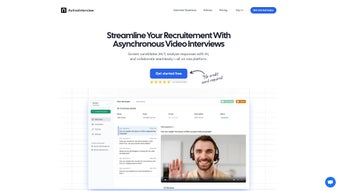
- Collaborative Review Dashboard: Recruiters, hiring managers, and team members can watch, rate, and comment on videos simultaneously.
- Bulk Invitation & CSV Upload: Upload a list of candidates to send personalized interview links in minutes.
- Custom Branding: Upload logos, choose color palettes, and add welcome messages for a fully on‑brand experience.
- Zapier & ATS Integrations: Connect to Greenhouse, Lever, Slack, Google Sheets, and more for automated workflow triggers.
- Secure Data Handling: AES‑256 encryption at rest, TLS 1.2+ in transit, and compliance with GDPR, CCPA, and ISO 27001.
- Multi‑Device Support: Works on desktop browsers, tablets, and smartphones without requiring a separate app.
- Live Support Channels: Email, live chat, and on‑demand Zoom sessions are available for onboarding and troubleshooting.
Installation & Usage – A Frictionless Walkthrough
Because ActiveInterview lives entirely in the browser, there is no traditional installation for end users. Organizations only need to set up an admin account and configure their first interview. Below is a concise, 7‑step guide that covers everything from sign‑up to reviewing the first batch of candidate videos.
- Create Your Account: Visit ActiveInterview.com, click “Start Free Trial,” and fill in basic company details. After email verification, you receive a secure link to the admin dashboard.
- Configure the Interview: In the dashboard, select “Create Interview,” enter the job title, upload the job description, and let the AI suggest interview questions. Edit, reorder, or add custom questions as needed.
- Brand the Experience: Navigate to the “Branding” tab to upload your logo, set primary colors, and write a personalized welcome message, ensuring a consistent candidate interface.
- Send Bulk Invitations: Prepare a CSV with candidate name, email, and optional custom fields. Upload it, map the columns, and ActiveInterview generates unique interview links for each candidate. Emails are dispatched automatically, and delivery status can be monitored in real time.
- Candidates Record Answers: Recipients click the link, sign in with a one‑time code, and complete a quick audio/video test before starting. Recordings are stored securely in the cloud and become instantly available for review.
- Review, Rate, and Export: Open the “Review” tab to view each video alongside AI‑generated transcripts, keyword highlights, and a rating slider. Team members can add private comments or public tags. Export a CSV report with ratings, transcript excerpts, and video URLs for archiving or ATS import.
- Analyze & Optimize: Use the built‑in analytics dashboard to track average time‑to‑complete, candidate drop‑off points, and question effectiveness. Refine future interview sets based on these insights to continuously improve your hiring funnel.
The entire workflow—from account creation to final decision—can be completed within a single afternoon, freeing up weeks of manual scheduling, note‑taking, and follow‑up communication.
Compatibility, Pros & Cons, and Frequently Asked Questions
Supported Operating Systems
ActiveInterview is a web application that runs on any modern browser supporting HTML5, WebRTC, and JavaScript. Tested environments include:
- Google Chrome (latest) – Windows 10/11, macOS 12+, Linux
- Mozilla Firefox (latest) – Windows, macOS, Linux
- Microsoft Edge – Windows, macOS
- Safari (12+) – macOS, iOS 13+ (mobile browsers are fully supported)
No additional plugins or desktop clients are required, making it ideal for distributed teams with mixed operating systems.
Pros
- Speed: Reduces average screening time from days to hours by automating video capture and AI analysis.
- Flexibility: Candidates can complete interviews on their own schedule, boosting response rates.
- Data‑Driven Insights: Transcripts and keyword extraction help recruiters focus on high‑impact moments.
- Collaboration: Real‑time rating and commenting streamline consensus building across remote hiring teams.
- Scalability: Bulk invitations and unlimited interview storage support high‑volume hiring campaigns.
- Brand Consistency: Customizable UI ensures a professional, on‑brand candidate experience.
- Integration Friendly: Zapier connectors enable automated data flow to ATS, Slack, and HRIS systems.
Cons
- Learning Curve for AI Settings: Fine‑tuning AI‑generated questions for niche roles may require experimentation.
- Subscription Cost: Small startups with tight budgets might find the monthly fee higher than basic video‑recording tools.
- Internet Dependency: Candidates in low‑bandwidth regions may experience buffering or reduced video quality.
- Limited Mobile Editing: Advanced video editing (e.g., trimming) is only available on desktop browsers.
Frequently Asked Questions
Can candidates use a smartphone to record their interview?
Yes. ActiveInterview’s responsive web interface works on iOS and Android browsers, allowing candidates to record video and audio without downloading a separate app.
How does the AI generate interview questions?
When you input a job title and description, the AI scans industry‑standard role competencies and suggests a mix of behavioral and technical questions. You can edit or replace any suggestion before sending invitations.
Is there a way to export interview data to our ATS?
Yes. ActiveInterview integrates with popular ATS platforms via Zapier, and you can also export a CSV report containing candidate ratings, transcript excerpts, and direct video URLs for manual import.
What security standards does ActiveInterview follow?
The platform uses AES‑256 encryption for data at rest, TLS 1.2+ for data in transit, and complies with GDPR, CCPA, and ISO 27001. Role‑based permissions let administrators control who can view or edit interview content.
Can I try ActiveInterview before committing to a subscription?
A 14‑day free trial is available with full feature access. No credit card is required to start the trial, and you can cancel anytime before the trial ends.
Conclusion – Should You Adopt ActiveInterview?
In today’s competitive talent market, speed, consistency, and candidate experience are decisive factors. ActiveInterview delivers a compelling blend of AI‑powered question generation, asynchronous video capture, and collaborative review tools that together shave days off the screening process. Its robust security, multi‑device compatibility, and seamless Zapier integration make it a solid fit for remote‑first teams and organizations looking to scale hiring without sacrificing quality.
While the subscription cost may be a consideration for early‑stage startups, the productivity gains—fewer scheduling headaches, richer data for decision making, and a polished brand experience—often outweigh the expense. If you’re ready to modernize your recruiting funnel, reduce bias through structured interview data, and empower hiring teams to make faster, evidence‑based choices, ActiveInterview is worth a test run.
Ready to accelerate your hiring? Click the button below to start your free 14‑day trial, explore the AI‑generated interview builder, and see how video screening can transform your recruitment pipeline.



.png)



